![VS-Logo-1.jpg]](https://support.vsware.ie/hs-fs/hubfs/VS-Logo-1.jpg?height=40&name=VS-Logo-1.jpg)
Last updated 13/10/2025
Schools using the online payments platform within VSware can now offer parents the option to pay fees by instalment.
When setting up a new fee, schools can choose to enable instalment payments and select the payment frequency and amount. Parents who select this option will have the agreed amount automatically deducted from their card until the fee is fully paid. Parents may also choose to pay the full amount in a single lump sum if they prefer.
Creating a Fee with Installments
-
Go to the Fees section and create a new fee as normal.
-
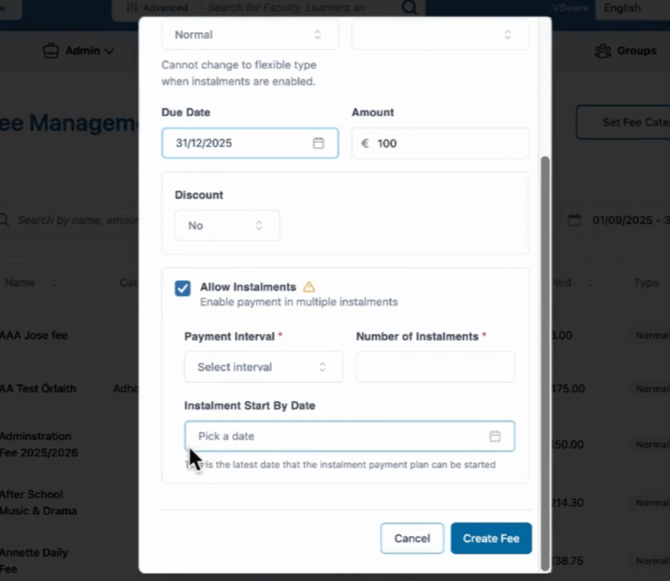
Click Allow Installments.
-
Choose the payment interval (daily, weekly, monthly, or yearly).
-
Enter the number of instalments.
The system will automatically calculate the amount for each payment.
- The system will generate a summary showing the payment frequency and amounts.
Depending on the fee type and the start date, it will also specify the instalment schedule to help ensure payments are made in good time.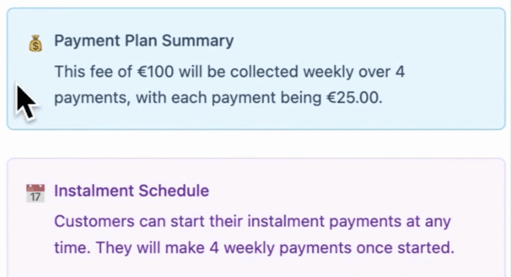
In the example below, the specific dates that parents need to start payment on are outlined.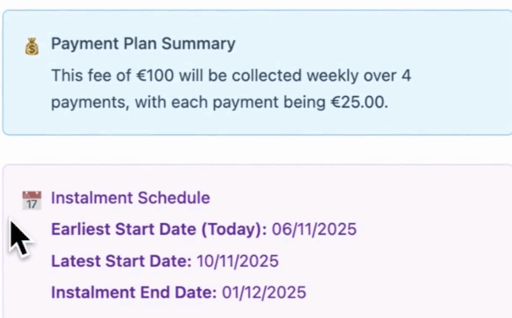
6. Click Create Fee
Viewing Installment Details
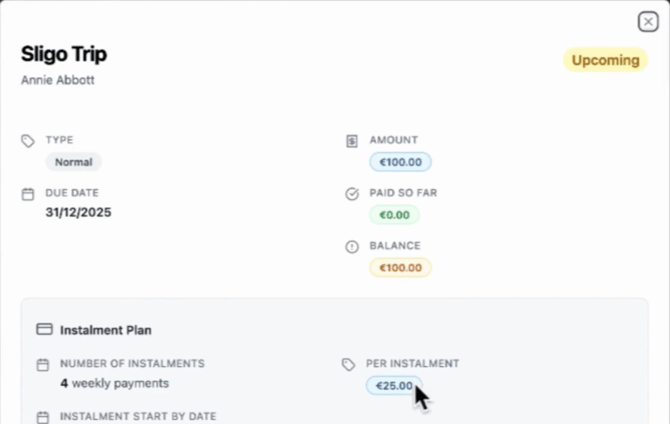
Once saved, installment information appears on each student’s profile under the Fees section, showing:
-
Number of payments
-
Payment frequency
-
Total amount owed
Managing Fees
All fees can be viewed together, with the option to filter the list for easier review and management.
Parents can choose to pay:
-
In full, or
-
Using the installment plan (if installments have been set up by the school).
Exporting Reports
A full list of fees and installment setups can be exported for record-keeping or review.
If you still have questions, please visit our knowledge base at support.vsware.ie. You can contact our support team via email at support@vsware.ie, via the chat bubble when you are logged into your VSware account or via phone on 01-5549628. Support hours are Mon - Fri, 08:30 - 18:00.