![VS-Logo-1.jpg]](https://support.vsware.ie/hs-fs/hubfs/VS-Logo-1.jpg?height=40&name=VS-Logo-1.jpg)
|
To help you navigate this quickly, we have outlined the steps you need to take below: |
 |
|
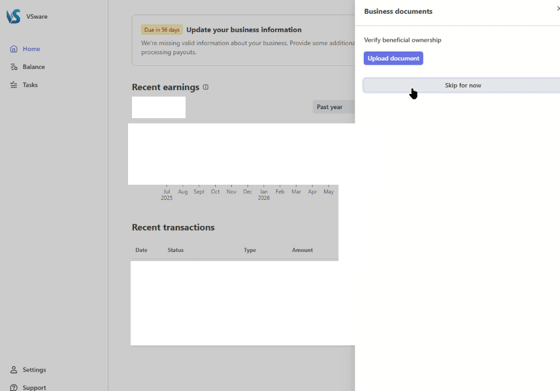
On the Stripe Dashboard please go the Update Business information banner. Where it asks you to upload a document to Verify beneficial ownership you can choose to Skip for now. |
 |
|
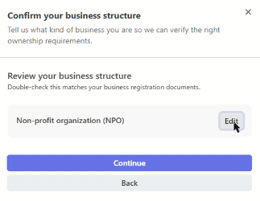
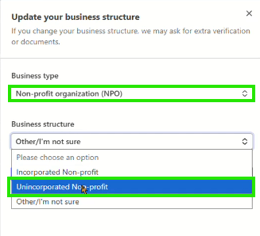
Click Continue and then the Edit button on the Review business Structure section.Make sure the business is listed as a Non profit organisation and the Business structure is listed as UNINCORPORATED Choose to Save. |
 |
 |
|
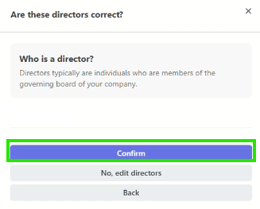
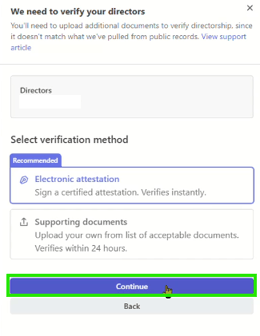
For the Who is Director section, please select the main user of the account and then Confirm. Please select the option to Sign electronic Attestation. |
 |
 |
|
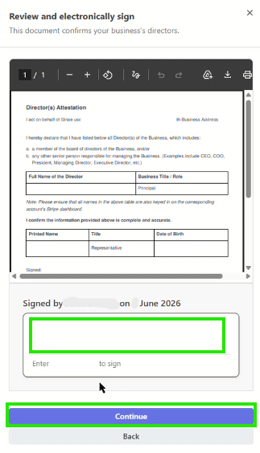
Click Continue and then Sign electronically. Finally, select Continue. |
 |
|
|